Google Home Smart Shade Integration | Elite Shade Solutions | Motorized Shades Southwest Florida
Google Home Smart Shade Integration
Hey Google Voice Control. Seamless Automation. Connected Living.
Transform your home with Google Home-enabled motorized shades from Elite Shade Solutions. By integrating your premium window treatments with the Google Home ecosystem, you gain effortless voice control through Google Assistant, powerful automations, and complete management from the Google Home app on your Android and iOS devices.
Simply say "Hey Google" to open, close, or adjust your shades to any position. Create routines that adjust your shades alongside your lights and thermostat, or automate your shades based on time of day, sunrise, sunset, or when you arrive home or leave.
Serving homeowners throughout Naples, Marco Island, Bonita Springs, Estero, and Fort Myers, we provide professional Google Home integration for motorized shades, ensuring your smart home works flawlessly across your Google Nest speakers, displays, and the Google Home app.
Google Home Compatible Hey Google Voice Control Routine Ready
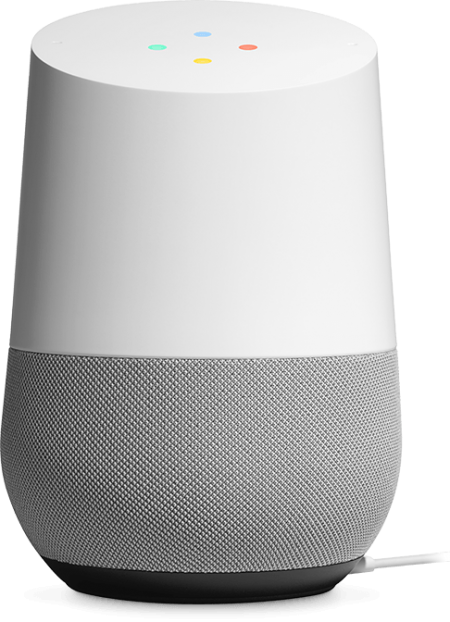
Google Home smart shade integration with Hey Google voice control
What Is Google Home Smart Shade Control?
Google Home smart shade control connects your motorized shades to the Google Home ecosystem, allowing you to manage your window treatments using the Google Home app on your Android or iOS device. Once integrated, you can control your shades with Google Assistant voice commands, create routines, and include them in automations with other Google Home-compatible devices.
Instead of reaching for a remote or walking to each window, simply say "Hey Google, open the living room shades" or "Hey Google, close the bedroom shades to 50 percent." Google Assistant responds instantly, positioning your shades exactly where you want them.
This integration transforms your motorized shades into a core component of your Google-powered smart home, working alongside your lights, thermostat, security system, door locks, and other Works with Google Home-compatible devices for a fully connected and intuitive home experience.
Hey Google Voice Google Home App Google Ecosystem
Google Assistant Voice Commands You Can Use
With Google Home integration, controlling your motorized shades with Google Assistant is natural and effortless.
Basic Hey Google Commands
  • "Hey Google, open the living room shades."
  • "Hey Google, close the bedroom shades."
  • "Hey Google, raise the kitchen shades."
  • "Hey Google, lower the patio shades."
Precise Positioning
  • "Hey Google, set living room shades to 50 percent."
  • "Hey Google, open bedroom shades 75 percent."
  • "Hey Google, close dining shades to 30 percent."
  • "Hey Google, lower office shades halfway."
Room & Routine Control
  • "Hey Google, open all shades."
  • "Hey Google, close downstairs shades."
  • "Hey Google, activate Good Morning routine."
  • "Hey Google, start Movie Time."
Google Home Routines & Automations
Beyond voice commands, Google Home allows you to create powerful routines and automations that control your shades alongside other compatible devices.
Create routines like:
  • Good Morning – Gradually open bedroom shades, raise living room shades, and provide weather updates.
  • Movie Time – Close shades, dim lights, and lower the television volume.
  • Good Night – Close all shades, lock doors, and play relaxing sounds.
  • I'm Leaving – Close shades, turn off lights, and set security system.
  • Reading Time – Set shades to 40 percent and adjust lighting to comfortable levels.
Create automations based on: Time of day, sunrise, sunset, when you arrive home, when you leave, or using voice commands. Your shades respond automatically to your schedule and presence.
Google Home routines and automations for motorized shades
Why Choose Google Home for Your Motorized Shades
Seamless Google Integration
Control your shades from the Google Home app on your Android or iOS device. Your shades appear alongside all your other Works with Google Home devices.
Hey Google Voice Control
Use natural voice commands with Google Assistant on your Google Nest speakers, displays, phones, or any device with Google Assistant built in.
Powerful Routines
Set your shades to open at sunrise and close at sunset. Create location-based automations that adjust shades when you arrive home or leave.
Security & Privacy
Google Home uses industry-standard security protocols. Your automation settings and control history remain private and can be managed through your Google account.
Energy Efficiency
Program your shades to close during the hottest part of the day, reducing solar heat gain and potentially lowering cooling costs.
Intuitive Experience
Google Home delivers a clean, user-friendly interface that makes controlling your shades as natural as asking for the weather or setting a timer.
Professional Google Home shade integration setup
Professional Google Home Integration Setup
At Elite Shade Solutions, we ensure your Google Home shade integration works perfectly across your entire Google ecosystem.
Our Google Home Integration Service Includes:
  • Google Home Device Pairing
  • Hey Google Voice Command Configuration
  • Room & Zone Organization in Google Home App
  • Custom Routine Creation
  • Automation Schedule Setup
  • Location-Based Automation
  • Multi-User Home Access
  • Testing & Optimization
  • User Training & Support
We handle every technical detail so your shades respond instantly to "Hey Google" and the Google Home app.
Why Choose Elite Shade Solutions for Google Home Integration
Google Home Expertise
Our team specializes in Google Home integration for motorized shades, ensuring reliable Hey Google voice control and seamless automation across your Google devices.
Complete Turnkey Service
From shade selection to Google Home setup and training, we manage every step of the process.
Personalized Routines
We help you create custom Google routines that match your lifestyle, from morning wake-ups to evening wind-downs.
Ongoing Google Support
We're available to help you discover new Hey Google commands, adjust routines, and get the most from your Google Home shades.
Premium Products
We only work with high-quality motorized shades designed for reliable Google Home compatibility and long-term performance.
Frequently Asked Questions
What Google devices work with motorized shades?
All Google Assistant-enabled devices work, including Google Nest speakers, Google Nest displays, Google Home, Google Home Mini, Google Nest Hub, and the Google Home app on Android and iOS devices.
Do I need to speak precisely for Google Assistant to control my shades?
Google Assistant understands natural language. You can say "open the shades," "raise the living room shades," "set bedroom shades to 40 percent" – all will work correctly.
Can I control shades with Google Assistant when I'm away from home?
Yes. Using the Google Home app on your phone, you can control your shades from anywhere with an internet connection. Hey Google voice commands also work remotely through your Google Nest devices.
Can Google Assistant control multiple shades at once?
Absolutely. Create rooms and zones in the Google Home app to control multiple shades simultaneously. You can also create routines that adjust multiple shades with one command.
Is Google Home secure?
Yes. Google Home uses industry-standard security protocols and authentication through your Google account. Your shade controls and automation settings are protected.
Do I need to set up Google Home integration myself?
No. Our professional installation includes complete Google Home setup, configuration, routine creation, and training. Your shades will work with Hey Google and the Google Home app from day one.
Ready to Add Google Home Control?
Experience the convenience, intelligence, and connectivity of Hey Google-controlled motorized shades with Google Home integration from Elite Shade Solutions.
Schedule your free in-home consultation today and discover how Google Home smart shade integration can transform your daily living experience across all your Google devices.